Get Sceen on your home screen
Pick your phone and browser, then swipe through the steps. Adding Sceen takes under a minute, and it then opens like an app, with its own icon and no browser bar. The last four steps turn on notifications, so Sceen can tell you when a place opens up, your certificate is ready, or your shift is tomorrow.
Your device
Your browser
Steps
About notifications
Once they're on, Sceen lets you know when:
- a place opens up and you move up from a waitlist
- your certificate is ready
- your shift is tomorrow (the reminder comes at 6 PM the evening before)
- the Sceen team changes your sign-up or your shift's time
- Each device has its own switch. Turn them on in My sign-ups on every phone or computer you use.
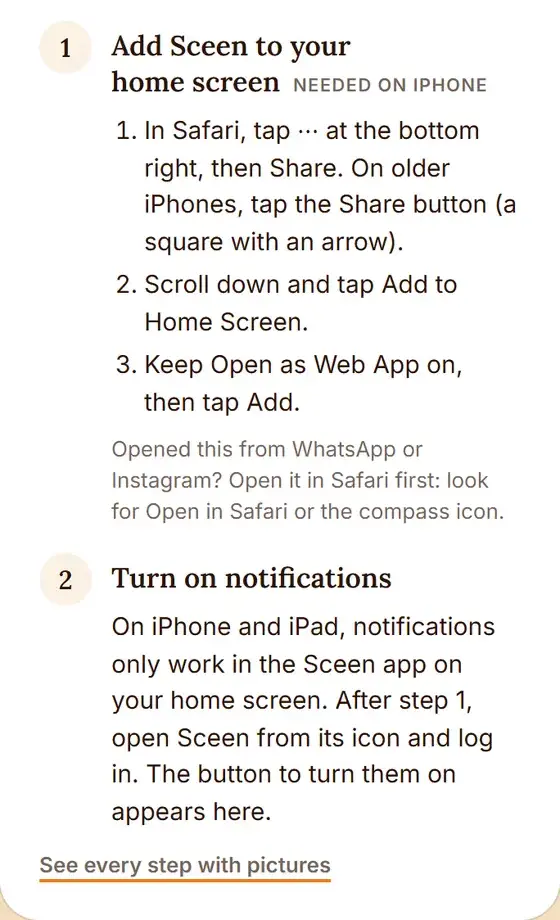
- On iPhone and iPad, notifications only work in the Sceen app on your home screen, on iOS 16.4 or newer. If you open sceen.me in Safari, the Notifications box tells you to add Sceen first:
- Deleted the Sceen icon from your iPhone? That switches notifications off too. Add Sceen to your home screen again and turn them back on.
- A notification can arrive late when your phone is offline or saving battery. We still email you when you move up from a waitlist, so keep an eye on your email.
- To stop them, tap Turn off in the Notifications box. Logging out on a shared phone also stops yours on that phone.
Tapped Don't allow by mistake?
AndroidPress and hold the Sceen icon, tap App info, then Notifications, and turn them on.
iPhoneOpen Settings, then Notifications, then Sceen, and turn on Allow Notifications.
ComputerIn the Sceen window, open the menu at the top right (⋮ or ⋯), find App info or Site permissions, and set Notifications to Allow.
Then open My sign-ups again and tap Turn on notifications.
Menu names change a little between phone makers and browser versions. If a step looks different on your phone, look for the closest match: Install, Add to Home screen, or Add to phone. Need a hand?Message Sceen on WhatsApp.